


Gryphon Connect
3.3344.00 Reviews
App Specs
- Version
- 05.0003.55
- Updated On
- License
- Free
- Downloads
- 10,000+
- Developer
- Gryphon Online Safety
- Categories
- Lifestyle
- Platform
- Android
Screenshots
 Analysis by AppCompare
I think the most useful way to judge Gryphon Connect is not as a general Wi-Fi utility, but as the phone-based control point for a household that already uses Gryphon networking equipment. That distinction matters: it can make everyday network decisions feel approachable, but it is not a stand-alone replacement for a router or a universal controller for every home setup. As a free lifestyle app from Gryphon Online Safety, it is aimed at people who want to oversee connected devices and household access without turning routine changes into a technical project.
Getting to Know Gryphon Connect
First things first, setting up Gryphon Connect was a breeze. As soon as I downloaded the app from the App Store, I was guided through the installation process, which took me just a few minutes. No tech degree required here! The app is designed to work seamlessly with Gryphon routers, and once you’re up and running, you’ll find yourself in a control hub that makes managing your network feel like a walk in the park.
Readability and navigation
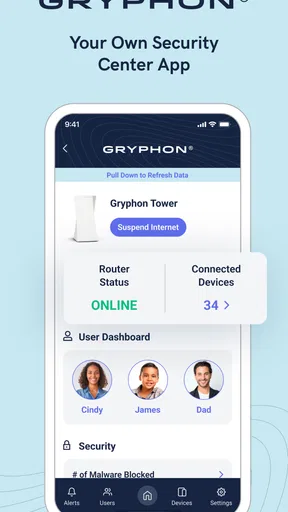
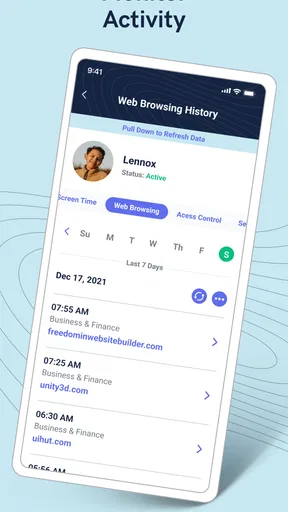
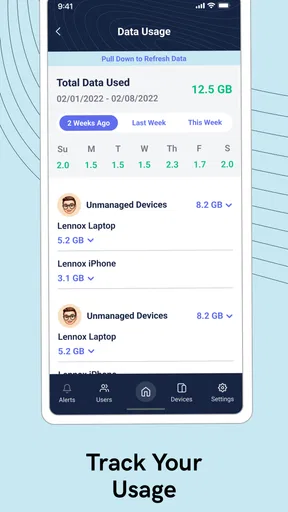
The user interface is clean and intuitive, which is a huge plus in my book. Everything is right where you’d expect it to be, meaning you won’t have to dig through endless menus to find what you need. The dashboard gives a clear overview of your network, and the real-time updates are handy for keeping tabs on what’s happening at home.
That overview is most helpful when you have a specific question, rather than when you simply want to browse. If someone says a device has lost access, I’d start at the dashboard, identify the device, then make the smallest change that solves the problem. That deliberate approach reduces the chance of changing a household-wide setting when only one person needs help. Clear navigation can make a router app feel less intimidating, but it still helps to know which device belongs to whom; a short, recognizable device name is more useful than a long technical label when you’re in a hurry.
The app’s everyday value also depends on the Gryphon hardware behind it. Its feature set is designed around Gryphon routers, so downloading it alone does not turn an existing router from another brand into a managed Gryphon network. I would check that the home’s equipment is compatible before planning around the app’s controls. If you are comparing router ecosystems, consider the hardware and its ongoing costs alongside the phone interface, rather than judging the app in isolation.
Features that Stand Out
So, what makes this app stand out in the crowded market of network management tools? Let’s dive into some of its standout features:
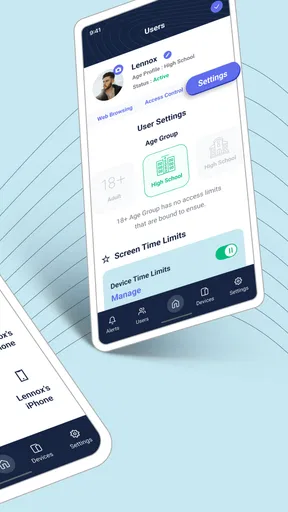
- Parental Controls: If you’ve got kids, you’ll love the parental controls. It’s super easy to set up restrictions, monitor usage, and even pause the internet with a tap. No more shouting “Dinner’s ready!” up the stairs – just pause the Wi-Fi and watch them appear like magic.
- Network Security: Gryphon Connect doesn’t just stop at managing devices; it’s also a guardian against threats. With real-time protection against malware and phishing, you can browse with peace of mind knowing your network is in good hands.
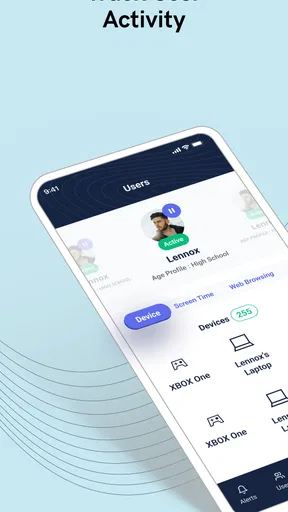
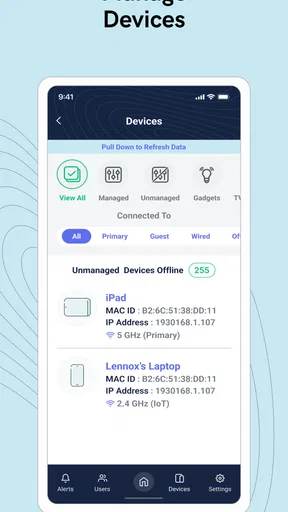
- Device Management: Whether you’ve got a smart fridge, a tablet, or a gaming console, this app lets you manage all devices connected to your network. You can prioritize bandwidth for certain devices, ensuring your Netflix binge doesn’t get interrupted by someone else’s gaming marathon.
Situational access and household routines
These controls make most sense when they support a clear household agreement. For example, a parent can use a pause as a brief signal that dinner is ready, while a device-specific restriction can suit a child who needs a predictable bedtime routine. I’d explain the rule before relying on a sudden interruption; that keeps a useful boundary from feeling like an unexplained punishment. It is also worth checking the device selection before tapping pause, especially in a home where several phones or tablets have similar names.
Worth Reading Before You Choose

Flipboard Shows What News Apps Must Do Beyond the Feed

Switching to Android Auto Means Rethinking Your Driving Routine

Google Calendar Makes a Crowded Week Easier to Manage

Ludo King Makes the Most of the Minutes Between Plans

Baby Panda World Brings Quick Play to Modern Phones, but Its Game Library Feels Busy

ESPN’s Live Game View Makes Following Close Games Easier
Guest access is another practical case. If relatives visit and need Wi-Fi, a guest network can spare you from giving out the password used by the household’s own devices. I’d still tell guests which network to join and keep the details somewhere easy for the host to find. A guest network is convenient, but it does not remove the need to manage who has access or to change arrangements when a visit becomes long-term.
For a busy evening, I can picture opening the dashboard after a video call starts to stutter, checking which devices are active, and prioritizing the device that needs a steadier connection. That is a more targeted response than repeatedly restarting equipment or asking everyone to stop using the internet. It is not a guarantee that every slowdown can be fixed from the app: the cause could be the internet service, the router’s placement, or a device problem. I would use the controls to narrow down the situation, not treat them as a substitute for troubleshooting the connection itself.
Motor and sensory considerations
For someone who finds technical language or complicated settings tiring, the dashboard and straightforward control style are appealing. A tap to pause access is easier to approach than configuring a network through a series of specialist-looking menus. At the same time, remote controls deserve careful use: a quick tap can affect another person’s access, so I would slow down enough to confirm the right device or setting before making a change.
For motor needs, this kind of app can be useful because routine management happens on a phone rather than requiring someone to reach the router. That may be more convenient for a person who has difficulty moving around the home, though phone navigation itself can still be a barrier for anyone who struggles with touchscreens. I would test the actions that matter most to the household before relying on them, rather than assuming that a simple-looking interface will suit every user.
Network controls can also shape sensory and attention demands at home. A parent may use scheduled limits or a pause to make device transitions more predictable, while another household may prefer not to make access changes in the middle of a task. I see the strongest results when rules are agreed in advance and the app is used consistently. The same control can feel reassuring in one routine and disruptive in another.
User Experience
One cool feature I found is the ability to create guest networks. Having friends over? No problem. You can set up a guest network with restricted access, so you don’t have to share your main Wi-Fi password. It’s a small touch, but one that adds a layer of convenience and security.
Compared with the router apps many people already use, Gryphon Connect’s main distinction is its close connection to Gryphon equipment and its emphasis on family controls as well as network oversight. A basic router app may be enough if you only need to rename a network or check whether the router is online. A general parental-control service may be a better fit if you need controls across networks or devices outside the home. I would choose Gryphon Connect when the household wants its router management and family access controls in one place and is comfortable building around the matching hardware.
Who should use it, and what to consider
I would recommend it most readily to a household with Gryphon routers, several connected devices, and someone who is willing to manage access thoughtfully. It can be especially useful for parents who want a simple way to set boundaries, people who host guests regularly, or anyone who wants a central view of home devices without opening a computer. If you are shopping for equipment as well as an app, compare the full router ecosystem with the alternatives you are considering; the app’s convenience only matters if the hardware suits the home.
I would skip it if you expect it to manage a non-Gryphon router, if you want a control panel that works across several router brands, or if you only need occasional basic Wi-Fi changes. In those cases, the router app you already have may be simpler and cheaper to maintain. It is also not a replacement for talking through household rules: an app can apply a limit, but people still need to agree on what the limit is for and how exceptions will be handled.
One practical tip is to name devices in a way that makes sense to the person who will manage them, then review that list before using controls during a busy moment. Another is to reserve a guest network for visitors instead of sharing the main password by habit. These small habits make device management clearer and reduce avoidable mistakes, especially when a household has several similar phones, tablets, or smart-home devices.
Remaining barriers
Now, it’s not all sunshine and rainbows. While the app is packed with features, it’s really designed to work best with Gryphon routers. If you don’t have one, you might not get the full experience, and some features might be limited. Also, some users have reported occasional connectivity hiccups, but in my experience, these were few and far between.
Another thing to note is the subscription model for advanced features. While the basic functionalities are free, you’ll need to shell out a bit extra for things like advanced parental controls and enhanced security options. It’s something to consider if you’re budgeting, but for the peace of mind it offers, it might just be worth it.
That makes the real cost question more than “Is the app free?” Gryphon Connect itself is free to download, but in-app purchases range from $0.99 to $89.99 per item, so I would check which capabilities are included in the plan you actually need before committing. The current version is 05.0003.46 and it supports Android 5.0 or later; that is useful if you are checking an older phone before installing. The app is rated for Everyone, and its average rating is 3.0 from around 557 ratings, with over 10,000 installs. Those figures suggest a modest user base and mixed experiences, so I would treat the app as a practical companion to the hardware rather than assume it will be flawless for every household.
Because the controls affect a shared connection, I would also decide who in the household is responsible for changing them. If several people make restrictions independently, a child’s schedule or a guest’s access can become confusing. A simple agreement about who manages the settings, and how someone can ask for an exception, makes the technology easier to live with. That is not a feature of the app; it is a small household practice that prevents a useful tool from becoming a source of friction.
An inclusive verdict
All in all, Gryphon Connect is a robust, user-friendly app that does a fantastic job of simplifying the complex world of network management. If you’re already in the Gryphon ecosystem, it’s a no-brainer. Even if you’re not, and you’re looking for a new router, their seamless integration might just sway you.
So, if you’re keen on keeping your home network secure, easily managed, and family-friendly, give Gryphon Connect a whirl. It’s like having a personal network assistant right in your pocket, and who wouldn’t want that?
My inclusive verdict is positive, with an important qualification: the app makes some home-network tasks feel more approachable, but ease of use is not the same as accessibility for everyone. The phone-based controls may help people who prefer to manage the router remotely, while touchscreen navigation, device identification, and the consequences of a mistaken tap can still create barriers. I would try the specific tasks each household member needs, agree on who can change restrictions, and choose another router ecosystem if broad compatibility or a different control method matters more. For a Gryphon home where clear, shared routines are the goal, it is a useful option; for everyone else, the hardware commitment is the deciding factor.
Pros
- User-friendly interface for easy navigation.
- Comprehensive parental control features.
- Real-time network monitoring capabilities.
- Customizable security settings.
- Seamless integration with smart devices.
Cons
- Limited advanced features for tech enthusiasts.
- Subscription required for premium features.
- Occasional connectivity issues reported.
- Setup process may be confusing for beginners.
- Limited customer support options available.
FAQs for Gryphon Connect
What is Gryphon Connect, and how does it enhance internet security?
Gryphon Connect is a smart Wi-Fi router app designed to provide enhanced internet security and parental controls. It offers features like malware protection, device management, and content filtering, which help safeguard your network and connected devices from online threats. Its easy-to-use interface allows users to monitor and control internet usage across all devices.
Can Gryphon Connect manage and monitor multiple devices simultaneously?
Yes, Gryphon Connect can effectively manage and monitor multiple devices on your network. It allows you to set specific controls and restrictions for each device, ensuring that every user has a tailored internet experience. This feature is particularly beneficial for families with multiple users, as it provides flexibility and control over internet usage.
Does Gryphon Connect offer parental control features, and how do they work?
Gryphon Connect offers robust parental control features that allow parents to manage their children’s online activities. You can block inappropriate content, set screen time limits, and pause internet access during specific hours. The app also provides real-time alerts and activity reports, helping parents make informed decisions about their children’s internet usage.
Is Gryphon Connect compatible with all types of internet providers and networks?
Gryphon Connect is designed to be compatible with most internet service providers (ISPs) and network types. It can be easily integrated into existing home networks without requiring significant modifications. Before installation, it’s recommended to check compatibility with your specific ISP and network setup to ensure seamless operation.
How user-friendly is the Gryphon Connect app for non-tech-savvy users?
The Gryphon Connect app is designed with user-friendliness in mind, making it accessible for non-tech-savvy users. Its intuitive interface guides users through setup and management processes with ease. Additionally, the app offers customer support and detailed guides to assist users in navigating and utilizing all features effectively.


